魔獸爭霸 /

戰國無雙包模組安裝教學

New Subject
Random
Previous
Next
|
戰國無雙包模組安裝教學

???步驟一魔獸魔獸極限資料片 戰國無雙包 可以使用十個額外的模組。
http://tw.dl.garena.com/nobu/XtremeMpqEnnbuV1.exe

步驟一:開始安裝囉!記得先把魔獸關掉唷!接著執行剛才下載的檔案。
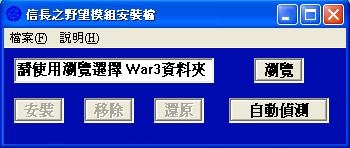
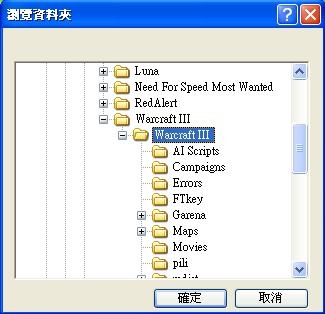
步驟二:先按瀏覽,去選擇魔獸爭霸安裝在電腦磁碟中的位置。
步驟三:先按還原,接著會出現【執行完畢!】字樣。
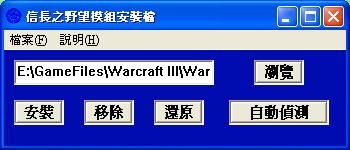
步驟四:回到步驟二再選一次路徑,接著按【移除】。

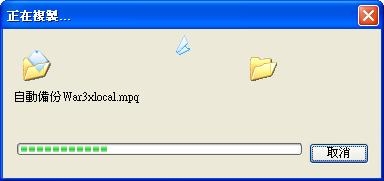
步驟五:回到步驟二再選一次路徑,接著按【安裝】,接著會出現自動備份及極限工作室字樣,最後出現【安裝完畢!】就搞定囉。
  • Keywords : 回到步驟二再選一, 魔獸爭霸安裝, 電腦磁碟中, 記得先把魔獸關掉唷, 步驟一魔獸魔獸極限資料, 會出現自動備份及極限工作室字樣, 執行剛才下載, 可以使用十, garena
00
2009-03-18T05:05:00+0000

  • Now, you can post comments by Facebook Account when your Yampiz account was logout or unvariable. whatever, we suggest to post comment by Yampiz Account to get more bounds to join new events of Heyxu
Comment
 
Verify
Comment

Archive DIR

    Facebook Page

    QR-Code and APP Launcher

    User Guide
    This Webpage

    In those service tabs, "Scan QRCode, in mobile device" or "Click the button, in this device" to open webpage or APP-related operations.
    QRCode

    Visitors

    • Visitors : 788,253
    • Hits : 880,078
    • Depth : 111.6 %
    • Auto Platform
      For better browsing experience, it will auto detects your device to display webpage.
    • Bug Report
      Tell us about the idea, problem and errors you found.
    • Comodo Secure
      The sensitive data transmission adopts by SSL-2048 authenticated encryption.
    • Copyright
      © 2009 YamPiz Digital Inc. & Jaby Group. All rights reserved.
    • Revised Version
      V2.2.555
      10 Dec 2025 (GMT+8)